


How to set up limits within opening hours
In this article
Keeping control over how many bookings and guests you take in per opening hour is an important part of running a smooth service. With Resos, you can set limits on bookings, guests, or both, either for an entire opening hour or for specific time intervals within it, so you never take in more than your kitchen or floor can comfortably handle.
What are booking and guest limits?
Limits let you cap the number of online bookings, the number of guests, or both, that can be booked within an opening hour. This is useful if you want to control capacity for a specific service, protect seating for walk-ins, or manage demand for a set menu, tasting, or themed evening without having to monitor and close bookings manually.
Entire opening hour vs time interval
You can choose where the limit applies:
For an entire opening hour - the limit covers the whole opening hour as one pool. Once the cap is reached, no further online bookings are accepted for that opening hour, regardless of the time slot chosen within it.
For a time interval - the limit applies to each individual time slot within the opening hour. This gives you finer control, for example allowing 20 guests at 18:00, 20 guests at 18:30, and so on, rather than one shared cap across the whole service.
Setting up limits
To add a limit, go to Menu → Settings & add-ons → General → Opening hours, select the opening hour you want to edit, and open Limits. From there, you can:
- Choose what to limit - bookings, guests, or both.
- Choose where it applies - for the entire opening hour or per time interval.
- Set the number - the maximum bookings and/or guests allowed.
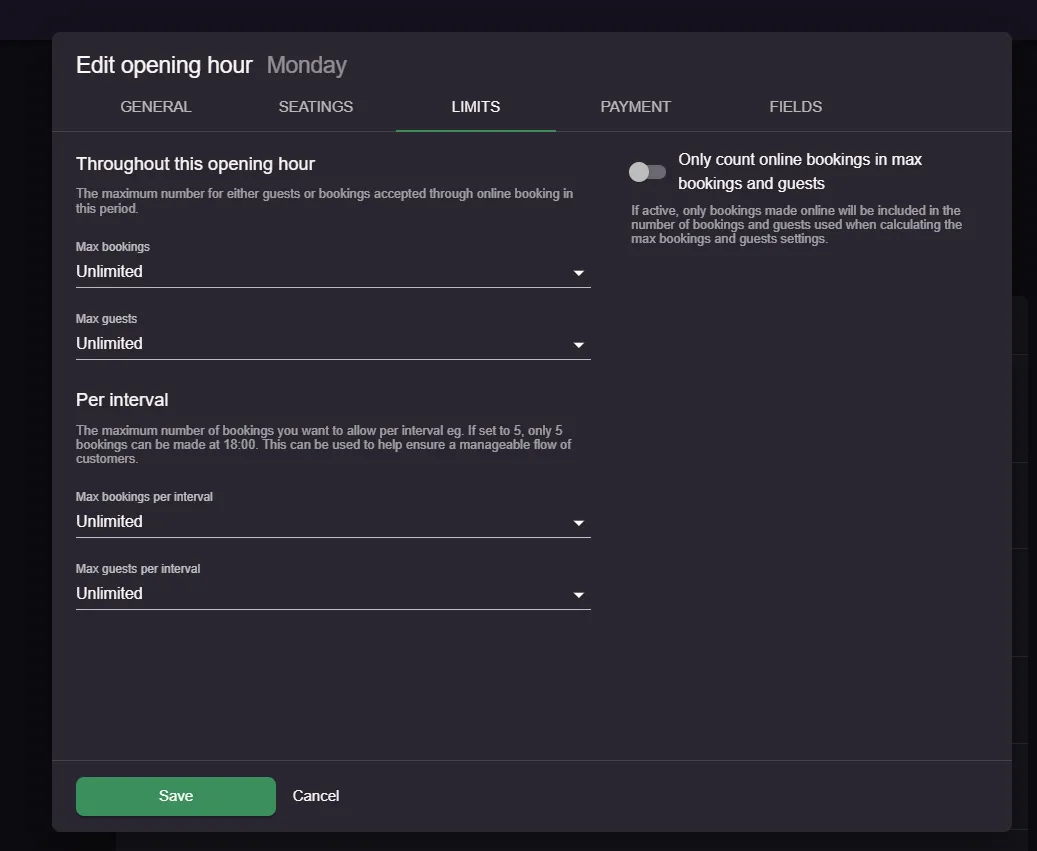
Once saved, the system will stop accepting further online bookings once the limit is reached, either for that opening hour or for that specific time slot, depending on what you have chosen.
Limits across multiple opening hours
If you run multiple opening hours at the same time, for example two different set menus or services running side by side, keep in mind that each opening hour has its own separate limit. Limits are not automatically shared or combined between opening hours.
This means that if you want a combined capacity across two opening hours, for example a total of 120 guests across two set menu options, you need to split the number between them manually, such as setting a maximum of 60 guests on each. Otherwise, one opening hour could fill up while the other still has unlimited availability, even though your actual capacity is shared.
Booking warnings when limits are overruled
If a limit is set and a member of staff manually creates a booking that goes beyond it, for example your maximum is 10 guests per opening hour and the new booking would take you over that, the system will show a warning. This appears before the Date, Time, and People section of the booking form, so staff can see they are overruling the settings before confirming the booking.
We hope you found this guide useful. If you have any questions about setting up limits on your opening hours or any general questions about Resos, do not hesitate to contact us at hi@resos.com. Our support representatives are excited to offer their help!